> ## Documentation Index
> Fetch the complete documentation index at: https://docs.livingsecurity.com/llms.txt
> Use this file to discover all available pages before exploring further.

# Abnormal Security 整合設定

> 連接 Abnormal Security，以匯入電子郵件威脅與網路釣魚活動資料。

export const PublicIntegrationNextSteps = () => <>
    <hr />
    <h2>相關資源</h2>
    <ul>
      <li>
        <a href="/zh-Hant/signals/data-sources">了解整合資料如何轉換為人員風險管理訊號</a>
      </li>
      <li>
        <a href="https://www.livingsecurity.com/integrations">探索 Living Security 整合</a>
      </li>
      <li>
        <a href="https://app.livingsecurity.ai/">開啟 Living Security Platform</a>
      </li>
      <li>
        <a href="https://www.livingsecurity.com/request-demo/">申請 Living Security 示範</a>
      </li>
    </ul>
  </>;

export const EgressIpSafelist = ({system}) => <Note>
    <strong>請將 Living Security 同步作業的全部四個輸出 IP 位址</strong>新增至{' '}
    {system} 的允許清單。若 {system} 要求使用 CIDR 表示法，請將每個位址分別以單一主機形式輸入，並加上 <code>/32</code>：
    <br />
    <code>52.34.139.153/32</code>, <code>54.69.127.183/32</code>, <code>44.247.133.183/32</code>,{' '}
    <code>52.26.211.56/32</code>
    <br />
    <br />
    流量可能從這四個位址中的任何一個送出，因此僅將其中部分位址加入允許清單，會導致間歇性的同步失敗。這四個位址在 Living Security 的所有區域中皆相同。如需完整清單、變更政策及疑難排解資訊，請參閱{' '}
    <a href="/zh-Hant/integrations/managing/egress-ip-addresses">
      設定整合輸出 IP 位址
    </a>。
  </Note>;

export const ConnectInPlatform = ({tile, children}) => <Step title="在 Living Security Platform 中輸入憑證">
    <p>
      由擁有 Living Security 存取權限的人員完成——即計畫負責人，或已受邀的系統管理員（委派設定）。
    </p>
    <ol>
      <li>
        前往 <strong>設定 → 集成 → 目錄</strong>，找到{' '}
        <strong>{tile}</strong> 圖磚，然後按一下 <strong>連接</strong>。
      </li>
      <li>
        填寫以下欄位，然後按一下 <strong>連接</strong>。
      </li>
    </ol>
    {children}
  </Step>;

export const SystemAdminBanner = ({system, recommendDelegated}) => <Note>
    <p>
      <strong>本指南適用於貴組織的 {system} 管理員。</strong>內容涵蓋在 {system} 中建立 API
      憑證的步驟，此操作需要 {system} 的管理員存取權限，而非 Living Security Platform 的存取權限。
    </p>
    <p>
      如果您是 Living Security 的<strong>方案負責人</strong>，且並非 {system} 的管理員，
      請將本頁面轉交給負責管理 {system} 的人員。對方完成 A 部分後，會將憑證交還給您
      （若您已邀請對方加入平台，對方也可以直接輸入憑證）。
      {recommendDelegated && <>
          {' '}由於設定過程會產生敏感的金鑰資料，建議採用{' '}
          <strong>委派設定</strong>方式，避免將密鑰傳回給您。
        </>}
    </p>
  </Note>;

<SystemAdminBanner system="Abnormal Security" />

## 此整合提供的資料

Abnormal Security 可提供經過標準化的電子郵件威脅、投遞、攔截及員工通報活動。已審查的範例包括：

* `phishing.real.blocked` — 在投遞前即被攔截的真實網路釣魚郵件
* `phishing.real.delivered` — 已投遞至收件匣的真實網路釣魚郵件
* `phishing.real.reported` — 通報真實的網路釣魚郵件

這些範例說明 Living Security 可使用的標準化活動類型。請參閱[整合資料如何轉換為訊號](/zh-Hant/signals/data-sources)。

## Living Security 所需資訊

| 認證資訊 | 說明 |
| - | - |
| **API 金鑰** | 從 Abnormal Portal 產生的 REST API 持有人權杖 |
| **區域 API 主機** | 您的 Abnormal Security 環境的主機名稱 |

\*\*權限範圍：\*\*自訂存取權限，並對 `Abuse Campaigns (AI Security Mailbox)` 與 `Threats` 授予 **Read**

\*\*所需角色：\*\*Abnormal Security 中的 **Security Admin** 或 **Super Admin**

### 先決條件

* 您必須在 Abnormal Security 中具備 **Security Admin** 或 **Super Admin** 存取權限，才能建立及管理 API 權杖。

***

## 第 A 部分 — 在 Abnormal Security 中

*此部分的步驟由您的 Abnormal Security 管理員完成。*

<Steps>
  <Step title="前往 API Token Management">
    1. 登入您的 Abnormal Security 入口網站。
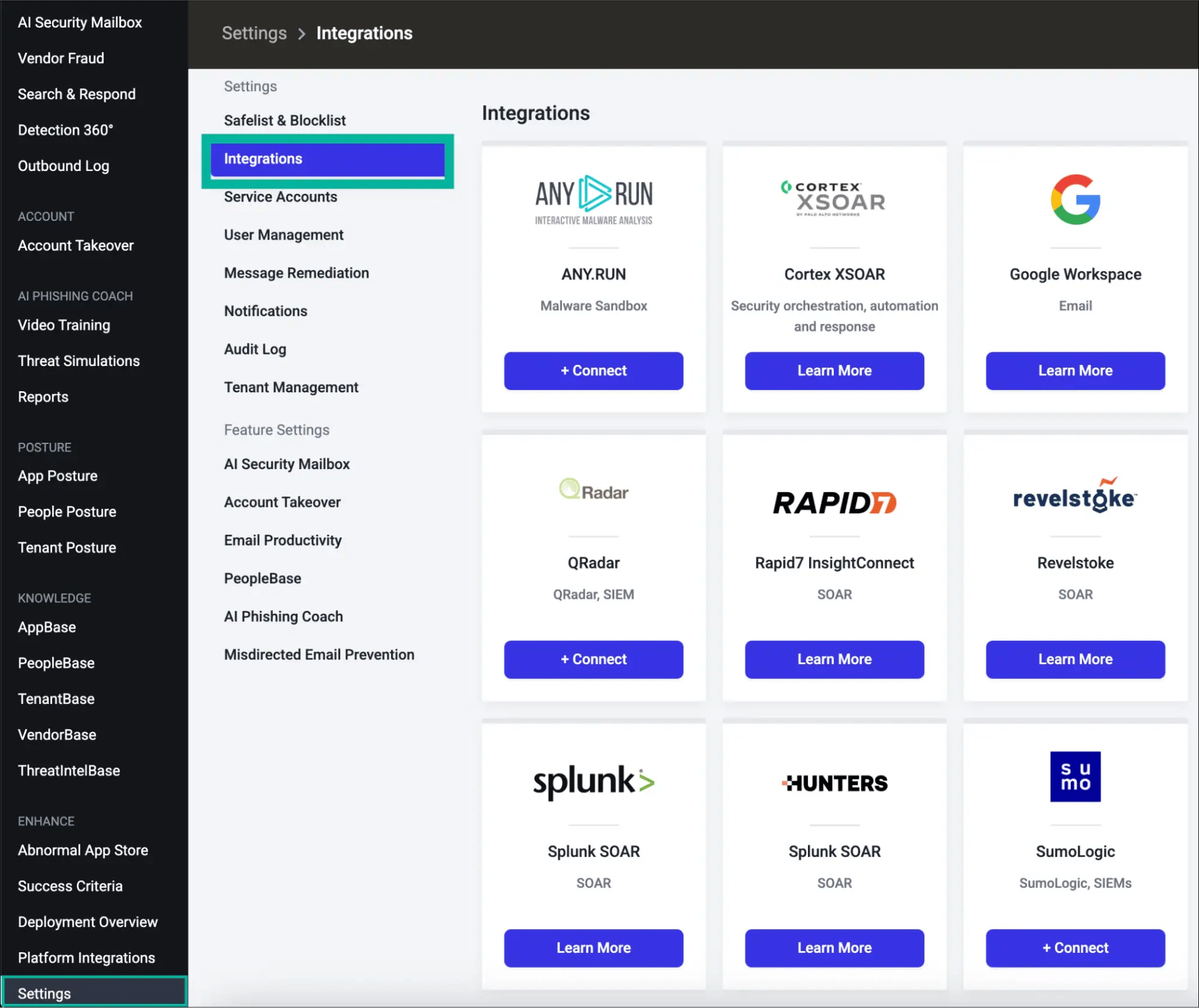
    2. 在左側導覽列中，按一下 **Settings**，然後選取 **Integrations**。

    <img src="https://mintcdn.com/livingsecurity/TnbD8Y_d8KdapRc2/integrations/images/abnormal-security/settings-integrations.webp?fit=max&auto=format&n=TnbD8Y_d8KdapRc2&q=85&s=7f5d7a616acdcf72a9048f16c6706b5e" alt="Abnormal Security 的 Settings 選單，顯示 Integrations 選項" width="1999" height="1680" data-path="integrations/images/abnormal-security/settings-integrations.webp" />

    3. 向下捲動至 **Integrations** 頁面底部的 **API Token Management** 區段。
    4. 按一下 **+ Create New Token**。
    <img src="https://mintcdn.com/livingsecurity/TnbD8Y_d8KdapRc2/integrations/images/abnormal-security/api-token-management.avif?fit=max&auto=format&n=TnbD8Y_d8KdapRc2&q=85&s=13cfdfb7ced9b3f3fca67c781ee7e844" alt="API Token Management 區段與 Create New Token 按鈕" width="1239" height="1151" data-path="integrations/images/abnormal-security/api-token-management.avif" />
  </Step>

  <Step title="選取整合類型">
    選取 **REST API** 作為整合類型，然後按一下 **Next**。
  </Step>

  <Step title="選擇權杖範圍">
    選擇權杖範圍，然後按一下 **Next**：

    * **Customer (All Current and Future Tenants)** — 若您的 Abnormal 帳戶管理多個租用戶，請使用此選項。此權杖會自動涵蓋所有現有及未來的租用戶。
    * **Tenant (Single Tenant)** — 使用此選項可將權杖限定於單一特定租用戶。

    對於只有單一 Abnormal 租用戶的大多數組織，兩種選項皆可使用。若不確定，請選取 **Customer**。
  </Step>

  <Step title="授予所需存取權限">
    選取 **Custom Access**，並為兩個端點群組啟用 **Read**：

    | 端點群組 | 所需存取層級 |
    | - | - |
    | **Abuse Campaigns (AI Security Mailbox)** | Read |
    | **Threats** | Read |

    然後按一下 **Next**。

    <Note>
      **Read** 存取權限會傳回非敏感的威脅與活動資料。**Read Sensitive** 另外會公開個人識別資訊 (PII)、附件及員工資料。**Write** 可提交修復行動。除非您的使用情境明確需要更多權限，否則請僅授予 **Read**。
    </Note>
  </Step>

  <Step title="設定權杖詳細資料與 IP 安全清單">
    填寫下列欄位：

    * **Token Name** — 具描述性的名稱（例如：`Living Security Platform`）
    * **Description** — 選填的背景說明（例如：`Read access for Living Security HRM platform`）
    * **Token Expiry** — 請選擇 **90**、**180** 或 **365 天**，以符合您的輪替政策。請設定行事曆提醒，在權杖到期前進行輪替。
    * **IP Safelist** — 輸入 Living Security 的出口 IP 範圍，每個項目一筆。每輸入一筆後，請按一下 **Add**。

    <EgressIpSafelist system="Abnormal Security" />

    <Warning>
      \*\*IP 安全清單為必填項目。\*\*Abnormal Security 會拒絕來自不在安全清單上之位址的所有 API 要求。連線對話方塊會顯示成功，但在正確的 IP 加入安全清單之前，資料同步將會失敗並出現 `401 Unauthorized`。
    </Warning>

    然後按一下 **Next**。
  </Step>

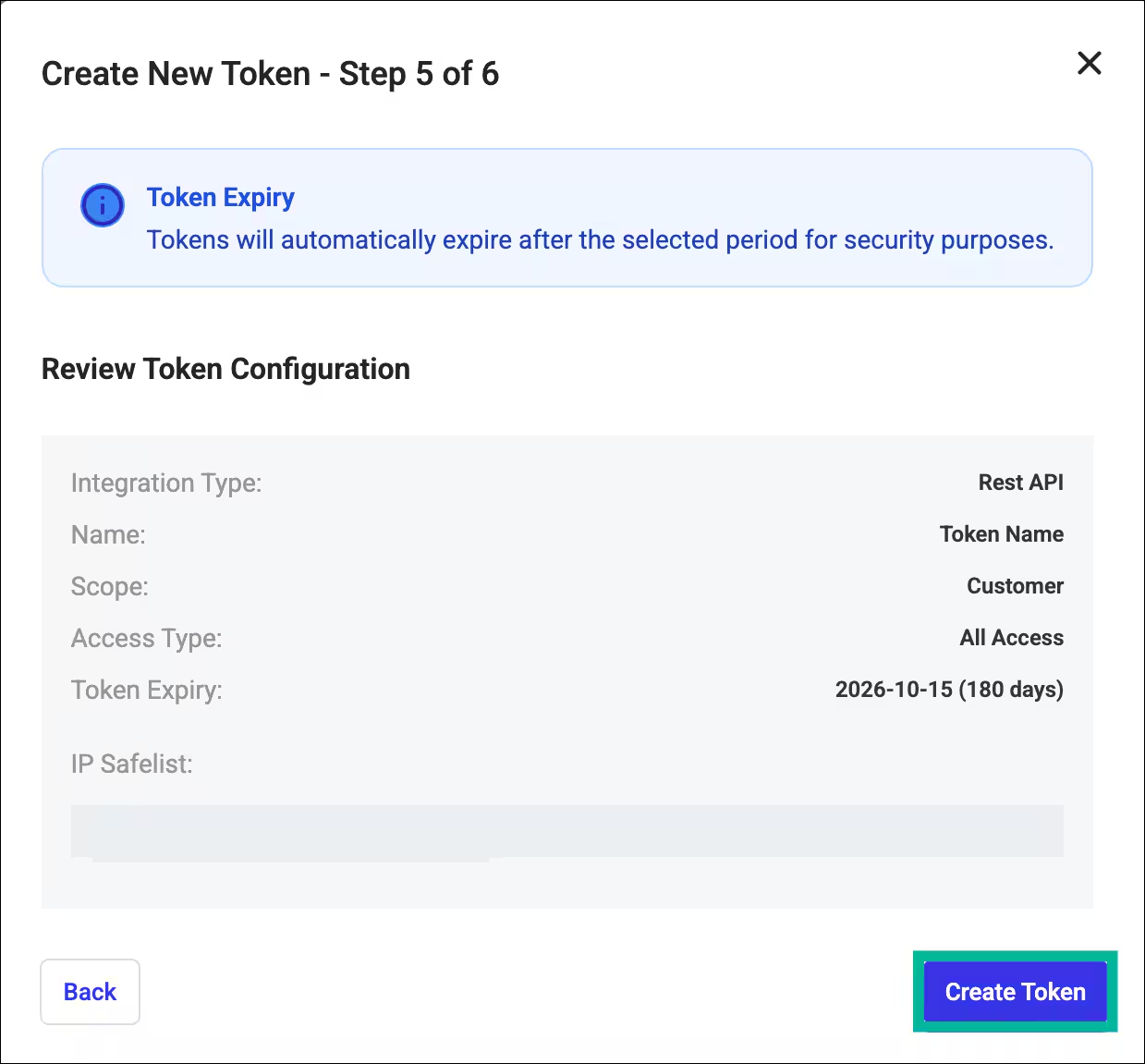
  <Step title="檢閱並建立權杖">
    檢閱權杖設定摘要，然後按一下 **Create Token**。

    <img src="https://mintcdn.com/livingsecurity/TnbD8Y_d8KdapRc2/integrations/images/abnormal-security/review-token.avif?fit=max&auto=format&n=TnbD8Y_d8KdapRc2&q=85&s=6935f488f5778fcea3f6907629aa1316" alt="權杖設定檢閱畫面" style={{maxWidth: "550px"}} width="1910" height="726" data-path="integrations/images/abnormal-security/review-token.avif" />
  </Step>

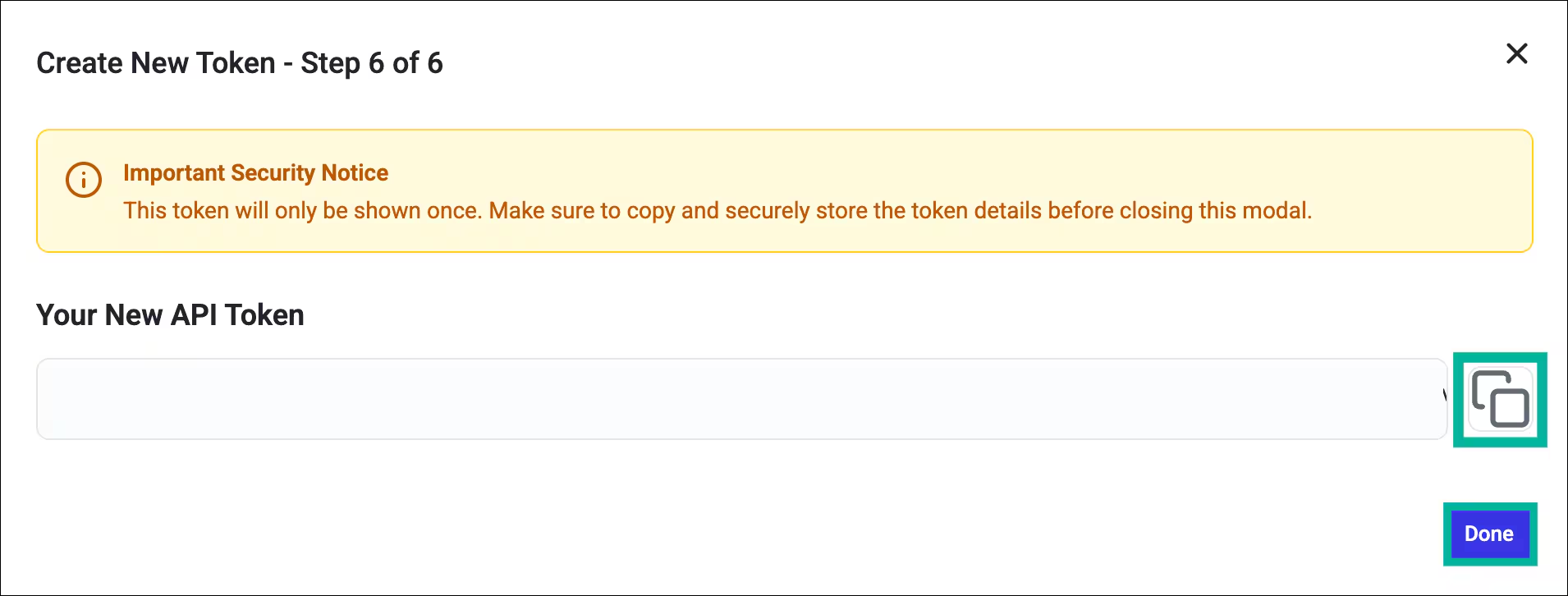
  <Step title="複製並儲存您的權杖">
    **請立即複製權杖**，並將其儲存在安全的位置（例如密碼保險庫或密鑰管理工具），然後按一下 **Done**。

    <img src="https://mintcdn.com/livingsecurity/TnbD8Y_d8KdapRc2/integrations/images/abnormal-security/copy-token.avif?fit=max&auto=format&n=TnbD8Y_d8KdapRc2&q=85&s=fa752c333af664ad5b3ed037dbb67143" alt="權杖複製對話方塊，顯示已產生的權杖" style={{maxWidth: "550px"}} width="1999" height="329" data-path="integrations/images/abnormal-security/copy-token.avif" />

    <Warning>
      Abnormal Portal **只會顯示一次**權杖值。如果您在未複製的情況下離開此頁面，就必須建立新的權杖並撤銷舊的權杖。
    </Warning>
  </Step>

  <Step title="識別您的區域 API 主機">
    確認您的 Abnormal Security 環境所對應的 API 主機：

    | 環境 | 區域 API 主機 |
    | - | - |
    | 預設（美國商業版） | `api.abnormalplatform.com` |
    | EU | `eu.rest.abnormalsecurity.com` |
    | FedRAMP | `rest.abnormalsecurity.us` |

    請僅輸入**主機名稱**，不要加上 `https://` 前綴，也不要加上結尾斜線。

    如果不確定貴組織使用哪一種環境，請查看您的 Abnormal 入口網站 URL，或聯絡您的 Abnormal Security 客戶團隊。
  </Step>
</Steps>

***

## 第 B 部分 — 在 Living Security Platform 中

*此步驟由計畫負責人完成；若採用委派式設定，則由系統管理員完成。*

<Steps>
  <ConnectInPlatform tile="Abnormal Security">
    | 欄位 | 值 |
    | - | - |
    | **API 金鑰** | 在第 A 部分步驟 7 中複製的權杖 |
    | **區域 API 主機** | 第 A 部分步驟 8 中的主機（美國預設值：`api.abnormalplatform.com`） |

    <img src="https://mintcdn.com/livingsecurity/oVkrOMkYmNevekTI/integrations/images/abnormal-security/connect-dialog.png?fit=max&auto=format&n=oVkrOMkYmNevekTI&q=85&s=46afa66685c5f59483324c863fd4fa86" alt="Abnormal Security 的 Living Security 連線對話方塊" style={{maxWidth: "450px"}} width="576" height="638" data-path="integrations/images/abnormal-security/connect-dialog.png" />
  </ConnectInPlatform>
</Steps>

您現在已連接至 Abnormal Security。

***

## 疑難排解

<AccordionGroup>
  <Accordion title="403 Forbidden — You do not have permission to perform this action">
    權杖缺少其中一項或兩項必要的存取授權（**Abuse Campaigns** 或 **Threats**）。整合類型、範圍及存取層級在權杖建立後無法變更，您必須以正確的設定建立新的權杖，並撤銷舊的權杖。
  </Accordion>

  <Accordion title="401 Unauthorized">
    原因可能是權杖無效或已過期，或是要求的 IP 不在安全清單上。請檢查：

    1. 權杖未被撤銷且未過期
    2. 所有四個 [Living Security 出口 IP 位址](/zh-Hant/integrations/managing/egress-ip-addresses)皆已加入安全清單

    如果同步先前運作正常，但現在失敗並出現 `401`，可能是出口 IP 位址已變更。請查看[設定整合出口 IP 位址](/zh-Hant/integrations/managing/egress-ip-addresses)，並確認安全清單與之相符。
  </Accordion>

  <Accordion title="舊版權杖到期（2027 年 4 月 30 日）">
    如果貴組織有在自助式 Token Management 功能推出之前建立的 API 權杖，這些權杖會在儀表板中顯示為 **Legacy**。舊版權杖仍可繼續使用，但無法輪替，只能更新其 IP 安全清單。所有舊版權杖將於 **2027 年 4 月 30 日**自動到期。請在該日期之前規劃以新權杖取代舊版權杖。
  </Accordion>
</AccordionGroup>

<PublicIntegrationNextSteps />


This documentation is built and hosted on [Mintlify](https://mintlify.com), a developer documentation platform.